
Comprehensive SQL Query for Retrieving Data Access across Various Security Context Types
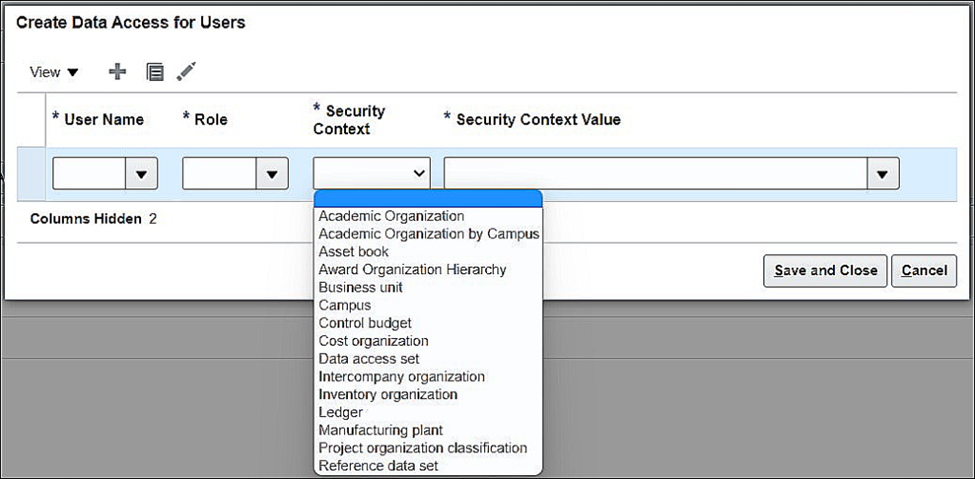
In Oracle Fusion Applications, understanding user data access across different security context types is essential for governance and compliance. The following SQL queries help retrieve information from the “Manage Data Access for Users” task, including Security Context Types, Usernames, and their Associated Roles.
Each query corresponds to a specific Security Context Type, providing insights into user-level data access configurations.
Asset Book
SELECT book.book_type_name, rl.ROLE_NAME, per.username
FROM fu.FUN_USER_ROLE_DATA_ASGNMNTS rl,
     fu.FA_BOOK_CONTROLS book,
     fu.per_users per
WHERE book.BOOK_CONTROL_ID = rl.book_id
  AND per.USER_GUID = rl.USER_GUID;
Business Unit
SELECT bu.bu_name, rl.ROLE_NAME, per. username
FROM fu.FUN_ALL_BUSINESS_UNITS_V bu,
     fu.FUN_USER_ROLE_DATA_ASGNMNTS rl,
     fu.per_users per
WHERE rl.org_id = bu.bu_id
  AND per.USER_GUID = rl.USER_GUID;
Control Budget
SELECT budget.NAME, rl.ROLE_NAME, per. username
FROM fu.FUN_USER_ROLE_DATA_ASGNMNTS rl,
     fu.XCC_CONTROL_BUDGETS budget,
     fu.per_users per
WHERE budget.CONTROL_BUDGET_ID = rl.CONTROL_BUDGET_ID
  AND per.USER_GUID = rl.USER_GUID;
Cost Organization
SELECT cost.COST_ORG_NAME, rl.ROLE_NAME, per.username
FROM fu.FUN_USER_ROLE_DATA_ASGNMNTS rl,
     fu.CST_COST_ORGS_V cost,
     fu.per_users per
WHERE cost.COST_ORG_ID = rl.CST_ORGANIZATION_ID
  AND per.USER_GUID = rl.USER_GUID;
Data Access Set
SELECT led. name, rl.ROLE_NAME, per. username
FROM fu.FUN_USER_ROLE_DATA_ASGNMNTS rl,
     fu.gl_access_sets led,
     fu.per_users per
WHERE led.ACCESS_SET_ID = rl.ACCESS_SET_ID
  AND per.USER_GUID = rl.USER_GUID;
Intercompany Organization
SELECT ic.INTERCO_ORG_NAME, rl.ROLE_NAME, per. username
FROM fu.FUN_USER_ROLE_DATA_ASGNMNTS rl,
     fu.FUN_INTERCO_ORGANIZATIONS ic,
     fu.per_users per
WHERE ic.INTERCO_ORG_ID = rl.INTERCO_ORG_ID
  AND per.USER_GUID = rl.USER_GUID;
Inventory Organization
SELECT inv.ORGANIZATION_CODE, rl.ROLE_NAME, per. username
FROM fu.FUN_USER_ROLE_DATA_ASGNMNTS rl,
     fu.INV_ORG_PARAMETERS inv,
     fu.per_users per
WHERE inv.ORGANIZATION_ID = rl.INV_ORGANIZATION_ID
  AND per.USER_GUID = rl.USER_GUID;
Ledgers
SELECT led.NAME, rl.ROLE_NAME, per. username
FROM fu.GL_LEDGERS led,
     fu.FUN_USER_ROLE_DATA_ASGNMNTS rl,
     fu.per_users per
WHERE rl.LEDGER_ID = led.LEDGER_ID
  AND per.USER_GUID = rl.USER_GUID;
Manufacturing Plant
SELECT mfg.DEF_SUPPLY_SUBINV, rl.ROLE_NAME, per. username
FROM fu.FUN_USER_ROLE_DATA_ASGNMNTS rl,
     fu.RCS_MFG_PARAMETERS mfg,
     fu.per_users per
WHERE mfg.ORGANIZATION_ID = rl.MFG_ORGANIZATION_ID
  AND per.USER_GUID = rl.USER_GUID;
Project Organization Classification
SELECT hr.CLASSIFICATION_CODE, rl.ROLE_NAME, per. username
FROM fu.FUN_USER_ROLE_DATA_ASGNMNTS rl,
     fu.HR_ORG_UNIT_CLASSIFICATIONS_F hr,
     fu.per_users per
WHERE hr.ORG_UNIT_CLASSIFICATION_ID = rl.ORG_ID
  AND per.USER_GUID = rl.USER_GUID;
Reference Data Set
SELECT st.SET_NAME, rl.ROLE_NAME, per. username
FROM fu.FUN_USER_ROLE_DATA_ASGNMNTS rl,
     fu.FND_SETID_SETS_VL st,
     fu.per_users per
WHERE st.SET_ID = rl.SET_ID
  AND per.USER_GUID = rl.USER_GUID;
Note:
Execute each SQL query individually to ensure optimal performance and accurate results.
- #1Trooper
- BI Report
- Data Access
- Oracle ERP
- Oracle Fusion
- Role-Based Access
- Security Context
- SQL Query
- sqlguru.ai blog
Related articles
From Data to Decisions: Simplifying Oracle Cloud ERP SQL Querying with SQLGuru.ai
In the high-stakes world of enterprise operations, data is more than a resource; it’s the foundation for every business decision. Yet for many organizations running Oracle Cloud ERP, there is a persistent gap between having access to data and actually using it effectively. The challenge isn’t the data itself; it’s the complexity of performing an…
Oracle Cloud ERP SQL Query vs. Traditional Reporting: Redefining Enterprise Business Intelligence
Enterprise decision-making depends on accurate, timely, and actionable insights. Oracle Cloud ERP provides multiple ways to access data, most commonly through traditional reports and SQL queries. While both approaches play important roles, understanding their strategic impact is essential. The comparison between Oracle Cloud ERP SQL Query and traditional reporting highlights how enterprises can redefine business intelligence in the digital era. Traditional ERP…
SQL Query for Oracle Cloud ERP: Turning Enterprise Data into Strategic Intelligence
In today’s enterprise landscape, data is more than an operational byproduct, it’s a strategic advantage. Oracle Cloud ERP generates massive volumes of transactional and operational data every day. The real challenge, however, is transforming that data into timely, actionable insight. This is where SQL Query for Oracle Cloud ERP becomes a critical capability for organizations seeking visibility, control, and informed decision-making. Unlike…